


H1 2026 has been about going back to the fundamentals: where are architecture and engineering practices losing time, making errors, or working around their software instead of with it? The answers shaped everything we built this half.
We’ve focused on the parts of the platform where A&E practices lose the most time: setting up and maintaining projects, tracking financial performance across the portfolio, running payroll, and finding information quickly across a busy system.
We’ve also addressed a steady stream of bug fixes and behind-the-scenes improvements along the way, because being fast and reliable matters just as much as new features.
The below covers everything that landed in H1, what it means for your practice, and what it signals about where we’re taking the platform in H2 and beyond.
Xero Payroll Integration
In A&E firms, payroll isn’t optional; it’s a critical workflow that needs to be accurate, controlled, and right every time. Moving approved timesheets and leave into payroll used to be one of those necessary but frustrating admin tasks. Not anymore.
Approved timesheets and leave in Total Synergy now flow directly into Xero. What used to take manual data entry across two systems is now a straightforward, automated workflow, with finance teams being able to control what goes into payroll and when using date ranges.
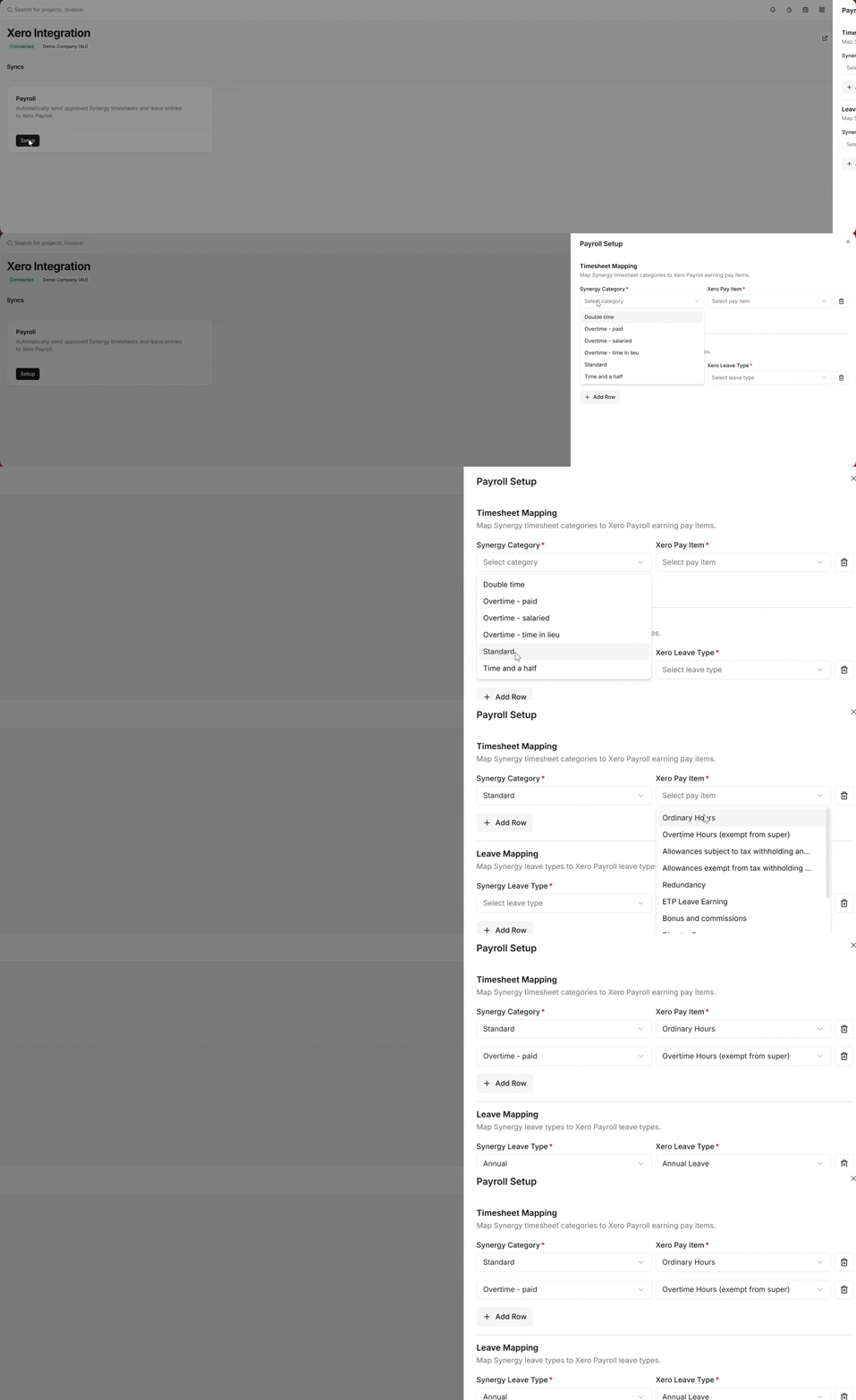
A built-in reconciliation view gives full visibility of each pay run, including any errors and clear guidance on how to resolve them. With Total Synergy as the one place time and leave live, pay runs are faster, more accurate, and far less stressful.
Key features:
- Approved time and leave sync directly from Total Synergy into Xero Payroll
- Eliminates the need for CSV exports or re-entering data
- Payroll approvals and compliance controls remain in Xero
- Teams can close payroll without manually reconciling timesheets across systems at the last minute
Global Search
Finding the right project, invoice, or contact in Total Synergy used to mean knowing exactly which module to look in.
Having to search through multiple modules for the information you need can be slow and time consuming. That’s why we introduced Global Search: a single search bar in the top navigation lets you search across Projects, Invoices, Contacts, Documents, Emails, and Staff at once, using exact words or natural language queries powered by AI semantic search.
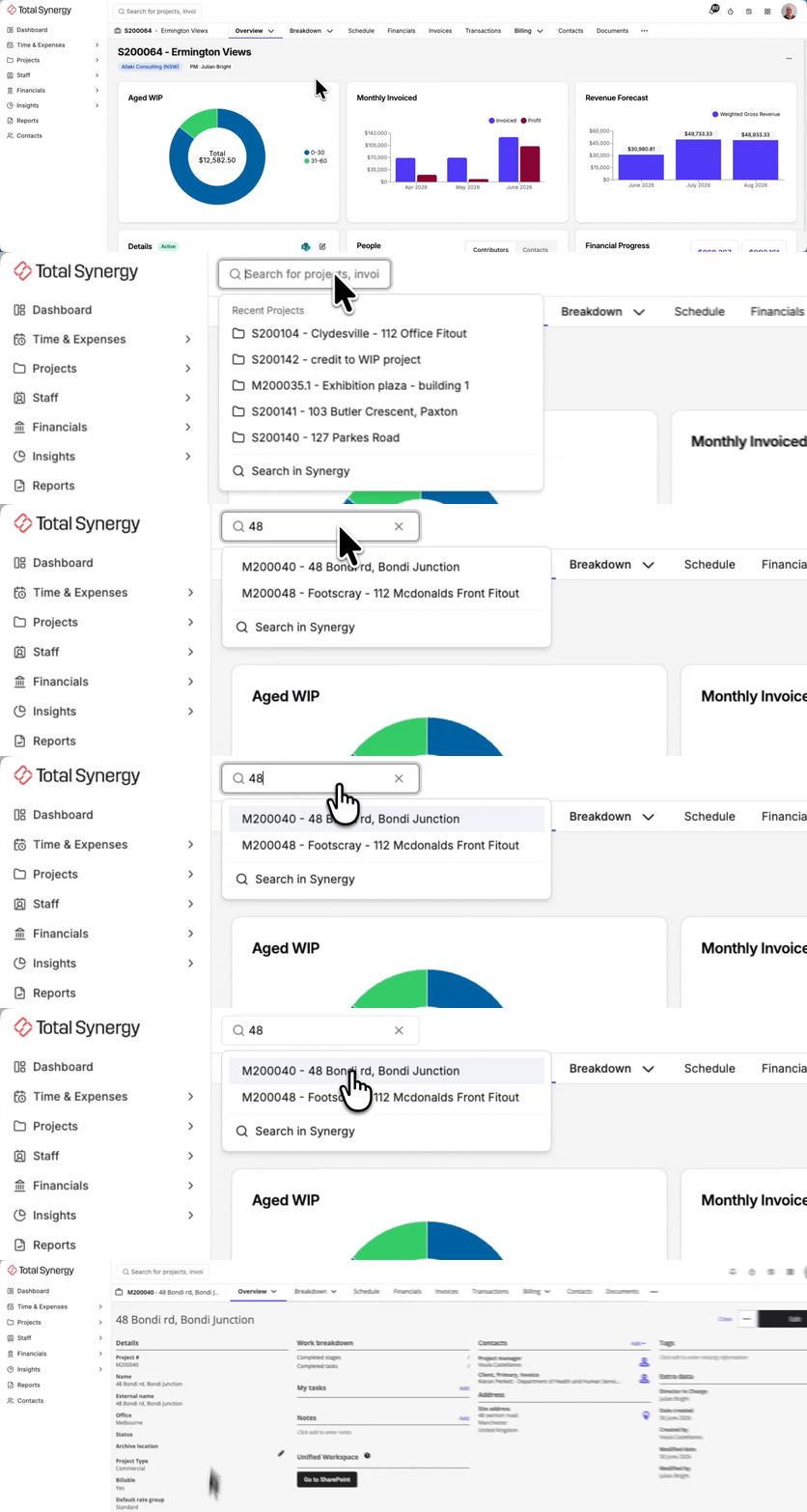
Results are ranked by relevance, recency, and how frequently you access them, and supporting details like project manager names and invoice status help you identify the right record quickly, without having to open it first.
Key features:
- Unified search across six record types from a single-entry point
- AI-powered semantic search for natural language queries
- Improved result ranking prioritising exact matches, identifiers, and recency
- Redesigned dropdown with clear layout and up to 30 results with infinite scroll
- Permission-aware results across all record types
Project Breakdown
Managing the structure and financials of a project used to mean jumping between screens, opening separate forms, and navigating into individual stages just to make small changes.
But now, we’ve turned the previously read-only Project Breakdown page into a fully interactive workspace for managing the structure and financials of a project. Project Managers can now create, edit, duplicate, delete, and reorder Phases and Stages without leaving the page, as well as manage contract fees and variations, and apply or save project templates.
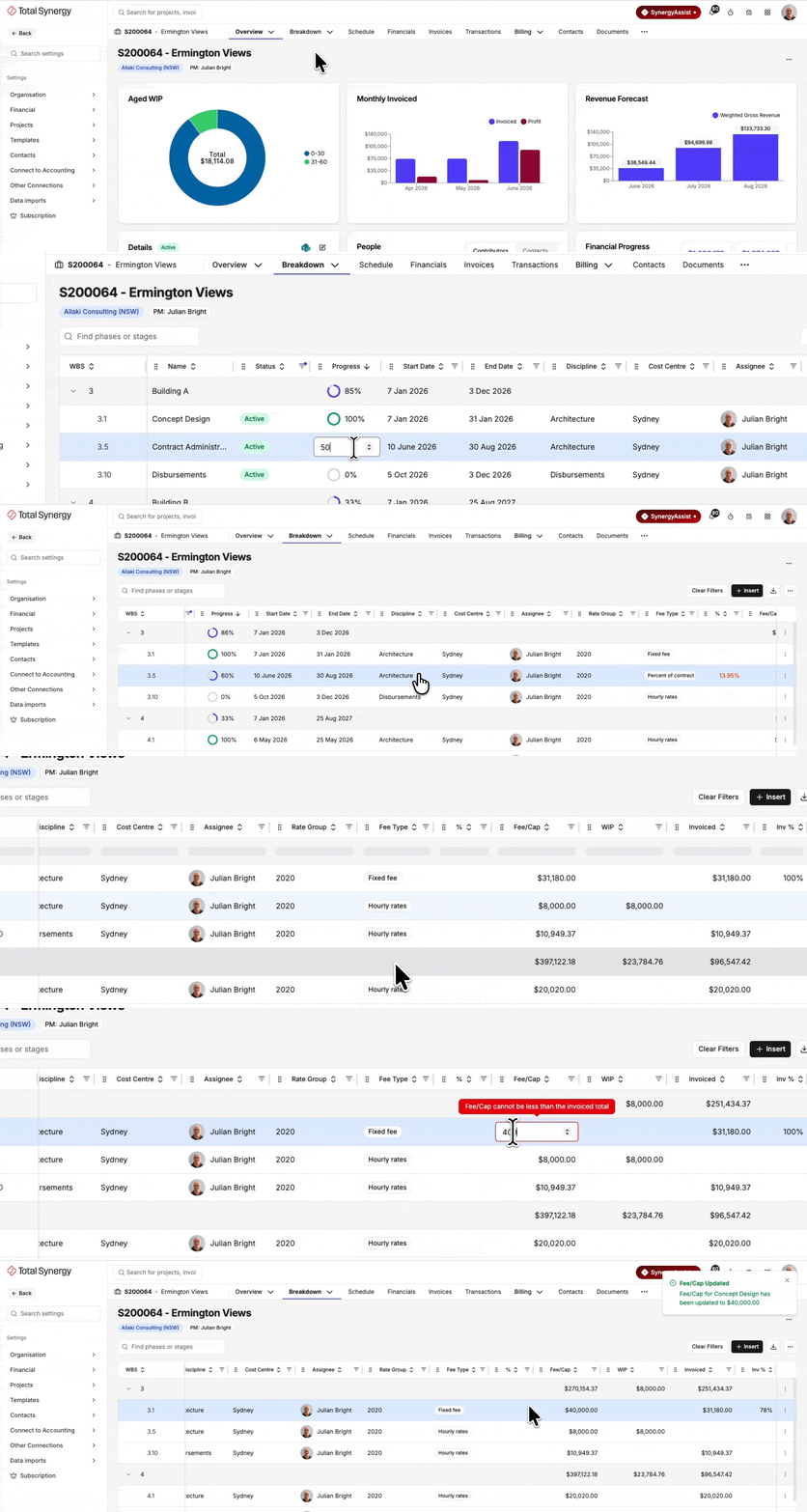
A range of smaller updates remove the friction that slows down project setup and maintenance, including inline date editing, side-pane editing for advanced fields, and the ability to delete a project directly from the page.
Key improvements:
- Inline editing of Stage names, assignees, fees, dates, and status
- Create, duplicate, delete, and drag-and-drop reorder Phases and Stages
- Apply a pre-built template or save the current structure as a new one
- Manage contract fee amounts and variations from a single page
- New Manage Projects security group with three granular permissions
Insights Pro
Most A&E firms already collect plenty of data. The hard part is getting to it quickly.
The Insights Pro add-on brings 52 configured BI dashboards across six different domains, purpose-built for A&E firms. Practices get reporting that works from day one, without having to configure it from scratch.

Key metrics, including utilisation targets, can be configured to reflect your staffing model, project mix, and business goals. In short: your team can act on the numbers continuously, instead of waiting until month-end.
Key features:
- 52 dashboards across six domains: finance, projects, sales, resources, planning, and business overview, designed for practice workflows
- Dashboards refreshed every two hours
- Key metrics including utilisation are configurable to your firm’s model
- 27 net-new dashboards for firms moving from Analytics Plus, including an entirely new Planning module
- Built specifically for A&E with no report-building or manual exports needed
Coming Soon: Project Portfolio
If your current process for checking on project health involves exporting a report, opening a second tab, and stitching numbers together in a spreadsheet, we’re launching just the thing.
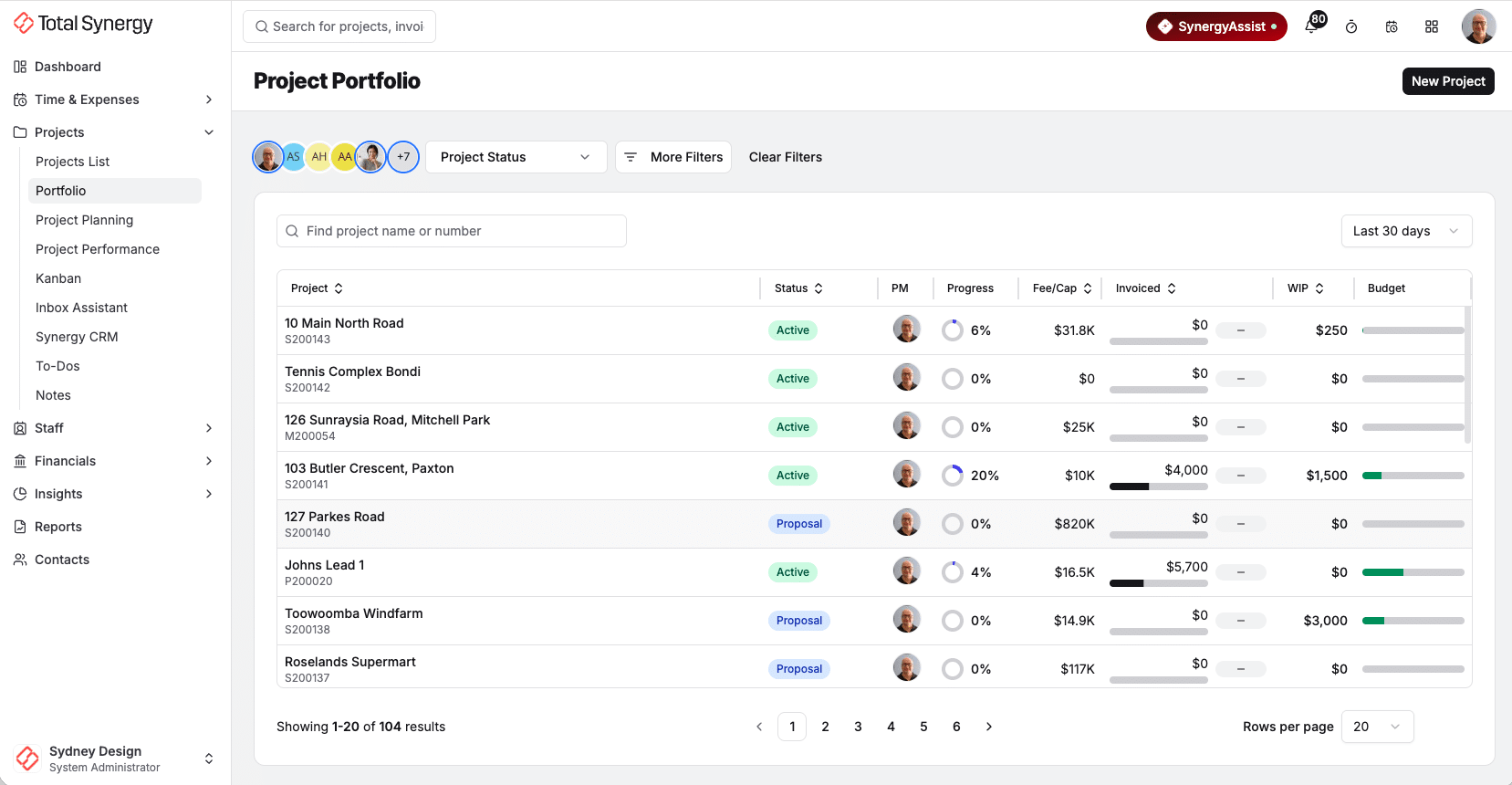
Launching in early H2 2026, Project Portfolio gives Practice Managers and Project Managers a single, sortable, filterable view of every project they’re responsible for, with key financial metrics surfaced directly as columns. No more navigating between screens to get a read on how project finances are tracking.
A live breakdown of fee, invoiced, WIP, budget, recovery, and profit sits alongside a Revenue vs Cost chart, giving you a focused financial snapshot of each project the moment you need it.
Key features:
- Configurable columns for fee, WIP, invoiced, budget, recovery, and profit
- Project Health indicator (On Track / Monitor / Attention) calculated from live data
- Key financial cards designed for scannability
- Filters by project status, stage status, discipline, cost centre, and office
Ongoing Improvements and Better Workflows
Every release this half is part of a deliberate push to give practice leaders more visibility, project managers more control, and everyone in between less manual work to deal with.
In addition to the product launches above, we’ve kept up a steady stream of ongoing platform improvements.
Behind the scenes, we stayed on top of the issues that slow you down, and most of what we fixed this half came straight from problems customers reported to us. Every fix targets a real point of friction, so you spend more time working and less time troubleshooting.
In H1, this included things like fixing draft invoices that were slow to create and save, addressing SharePoint delays on folder creation, and repairing broken filters across reporting and project management.
Those fixes add up to smoother, more reliable day-to-day work for the practices who told us what needed fixing.
We’re only half-way through 2026. H2 brings Project Portfolio and plenty more, and your feedback shapes what we prioritise next, so tell us where your practice still loses time. We’re listening.
About Total Synergy (Australia)
Total Synergy is an Australian software company based in North Sydney, NSW, helping architecture and engineering practices across Australia improve project visibility, resourcing, and profitability with project management and practice management software.