


Every hour your team spends on design work, client meetings, or site visits represents revenue for your firm. But many architecture practices lose thousands of dollars every year because those hours never made it onto a timesheet, or got recorded too late to bill accurately.
Good timesheet software does more than capture time. It connects your team’s hours to project budgets, invoicing, and profitability, so you can see exactly where your practice stands without waiting until month-end to find out.
What Architects Need From Timesheet Software
Timesheets are only useful if they connect to something. For architecture firms, that means linking time entries to specific projects, phases, and tasks, so the data flows through to budgeting, invoicing, and project reporting without manual reconciliation.
Look for these features when evaluating timesheet tools:
- Project and phase-level time entry so hours are captured against the right work
- Daily timers and weekly timesheet views to suit different working styles
- Timesheet approval workflows for managers and principals
- Integration with project budgets so burn rates update in real time
- Connection to invoicing to reduce double-handling
- Reporting on billable versus non-billable time
- Mobile access for site visits and remote work
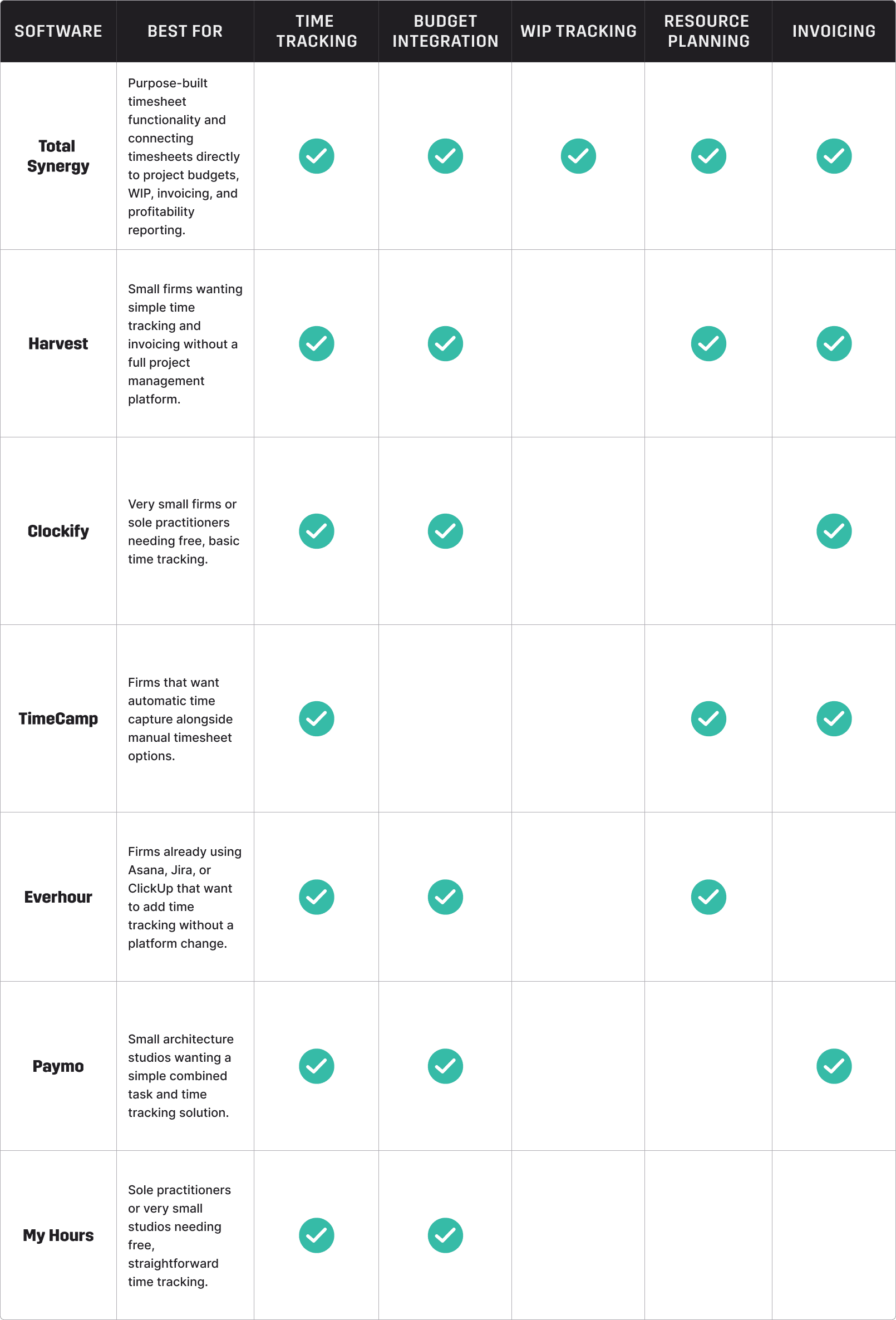
7 Best Timesheet Software Options For Architects
1. Total Synergy
Total Synergy includes purpose-built timesheet functionality as part of its all-in-one project management and financial platform for A&E firms. Unlike standalone time tracking tools, timesheets in Total Synergy connect directly to project budgets, WIP, invoicing, and profitability reporting.
What it does well for architecture firms:
Flexible time entry: Staff can log time using daily timers, weekly timesheets, or by copying a previous week’s entries. Time is recorded against specific projects, phases, and tasks, ensuring accurate data flows through to project financials.
Timesheet approvals: Managers and principals can review and approve time tracking entries before they affect project financials or invoicing. Approval workflows are configurable to suit your firm’s processes.
Billable versus non-billable tracking: Clearly separate billable project time from internal activities, professional development, and administration. This gives you an accurate view of your team’s utilisation rate without manual calculation.
Real-time budget impact: Every timesheet entry updates the project’s budget burn automatically. Project managers can see how much of each phase has been consumed at any point, not just at month-end.
WIP and invoicing connection: Time logged flows directly into WIP reporting and invoice generation. There is no need to re-enter data or reconcile across multiple systems.
Utilisation reporting: See individual and team utilisation rates across any period, broken down by project, phase, or staff member. This gives principals and operations leaders the visibility they need to manage capacity and profitability.
Mobile access: Log and track time from anywhere, whether in the office, on site, or working remotely.
2. Harvest
Harvest is a time tracking and invoicing tool used by professional services firms and creative businesses. It offers a clean interface for logging time, generating timesheets, and creating invoices based on tracked hours.
For architecture firms, Harvest handles basic time capture and invoicing well. It does not connect to project budgets at the phase level, does not manage WIP, and lacks the project financial reporting that practice leaders need. It works best as part of a broader tech stack rather than a standalone solution.
Best for: Small firms wanting simple time tracking and invoicing without a full project management platform.
3. Clockify
Clockify is a free time tracking platform with timesheet reporting, project tracking, and team dashboards.
It is widely used by professional services businesses looking for an accessible entry-level solution.
For architecture firms, Clockify provides solid time capture at no cost for the base plan. As firms grow and their project complexity increases, Clockify typically becomes a starting point rather than a long-term solution.
Best for: Very small firms or sole practitioners needing free, basic time tracking.
4. TimeCamp
TimeCamp is a time tracking platform with automatic time capture, project tracking, timesheet approvals, and basic billing features. It integrates with a range of project management and accounting tools.
TimeCamp’s automatic tracking is useful for architecture firms who struggle to log time consistently. But it lacks phase-level budget integration and the A&E-specific financial reporting that growing practices rely on.
Best for: Firms that want automatic time capture alongside manual timesheet options.
5. Everhour
Everhour is a time tracking tool that integrates directly within other project management tools such as Asana, Jira, and ClickUp. It adds time tracking and budget monitoring to whichever platform your team already uses for task management.
For architecture firms using one of those tools, Everhour is a practical way to add time tracking without switching platforms. It is dependent on a host platform and does not provide the standalone project financial management or invoicing that architecture practices need.
Best for: Firms already using Asana, Jira, or ClickUp that want to add time tracking without a platform change.
6. Paymo
Paymo is a project management and time tracking platform designed for small professional services teams. It covers task management, time tracking, scheduling, and invoicing in a single interface.
For architecture firms, Paymo covers the essentials of time tracking and basic project management at an accessible price point, but its financial reporting and phase-level project management are less developed than what growing practices typically need.
Best for: Small architecture studios wanting a simple combined task and time tracking solution.
7. My Hours
My Hours is a simple time tracking tool designed for freelancers and small teams. It offers project-based time tracking, basic reporting, and a free entry-level plan.
My Hours is accessible and easy to use. It does not offer project budgeting, WIP management, or the financial reporting that architecture practices of any meaningful size require, making it best suited to sole practitioners or very small teams.
Best for: Sole practitioners or very small studios needing free, straightforward time tracking.
Why Standalone Time Tracking Falls Short
Time tracking tools that exist outside project management and financial systems create familiar problems: data that has to be reconciled manually, errors that compound over a project’s life, and a team that does not understand why logging time matters.
When timesheets connect directly to project budgets, WIP, and invoicing, everything changes. Project managers can see real-time budget burn. Finance leaders can invoice accurately and on time. Principals can see utilisation across the firm without pulling a report together from three different sources.
That is the difference between a standalone time tracker and a purpose-built platform.
Built in Australia with support teams in Sydney and London, Total Synergy has been serving A&E practices for over 25 years. For more on how time tracking applies across engineering disciplines, see our guide to time tracking software for engineers. Book a demo to see how integrated timesheet management works in practice.